
DocSnapper: PDF Scanner & OCR
Scan Documents, Sign & Edit
Thunder Apps StudioIn-App Purchases
- Category
- Productivity
- Device
- iPhone
- Price
- FreeIn-App Purchases
- Developer
- Thunder Apps Studio
iPhone Screenshots


About DocSnapper
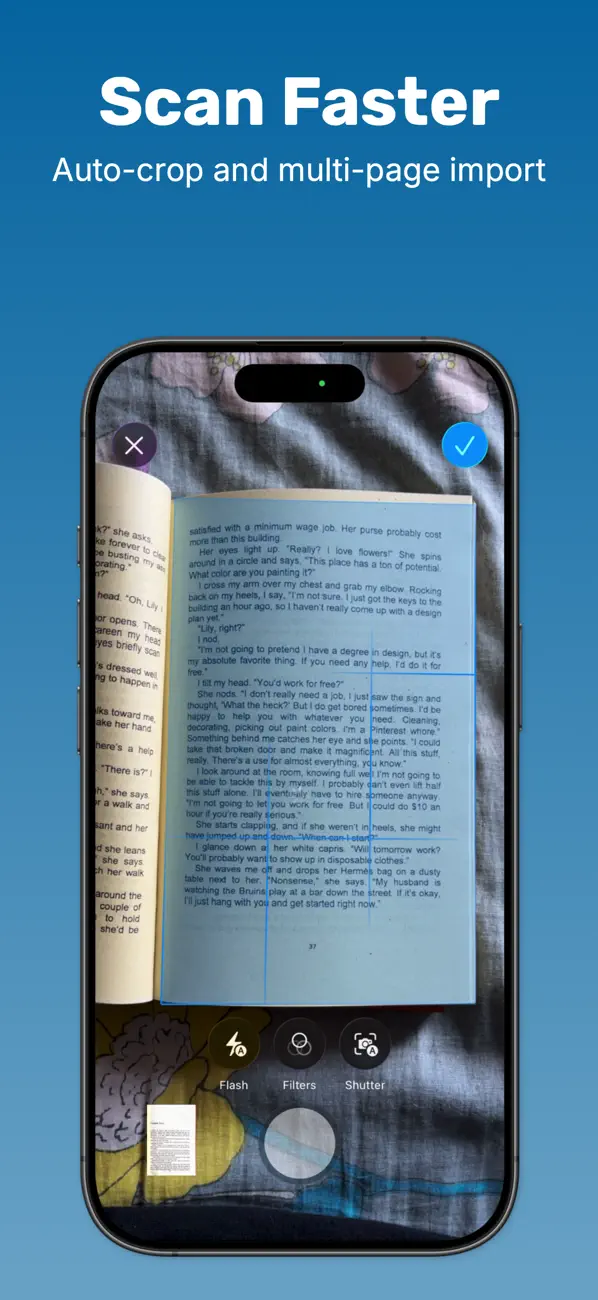
DocSnapper turns your iPhone into a full document scanner. Point the camera at a page and DocSnapper finds the edges, flattens the perspective and cleans up the image, then lets you sign it, redact it, run text recognition on it and export a sharp PDF.
It's built entirely on Apple's own Vision and VisionKit frameworks. Your documents are scanned, processed and stored on your device.
- Processed on your device
- 18 cleanup filters
- PDF, PNG, JPG & TXT export
- 10+ languages
What you can do
-
Scan and import
Multi-page capture with automatic edge detection, auto-crop and perspective correction. Import photos, PDFs and images from Files.
-
18 cleanup filters
Magic Color, Deep B&W, De-shadow, Whiteboard, Denoise, Sharpen and more, tuned for paper, receipts, whiteboards and handwriting.
-
A real editor
Sign, mark up, permanently hide sensitive info, add form marks, stamps and watermarks, change page size and fix curved pages.
-
Text recognition (OCR)
Pull the text out of any scan, read it full screen, copy or share it, or export a whole folder as a text file.
-
Replace text in a scan
Swap individual words in place. The patch matches the paper and ink color so the correction blends into the page.
-
Stay organized
Folders with search, sorting and drag to reorder. Every edit is non-destructive, so your original scan is always kept.
-
Export and share
PDF, PNG, JPG and TXT with compression controls and a live file-size estimate. Send to Files, Mail, Dropbox or any app.
-
iCloud sync
Your folders follow you to every device signed in to the same Apple Account, through your own private iCloud Drive.
Information
- Provider
- Thunder Apps Studio
- Category
- Productivity
- Compatibility
- iPhone
- Price
- Free
- In-App Purchases
- Yes
- App Store
- View on the App Store
- Terms of Use
- Terms and Conditions
- Privacy
- Privacy Policy